bci wheelchair gui
a gamified unity front end for a ros 2 autonomous pediatric power wheelchair - every child-facing function is reachable with two switches, one switch, or discrete commands from a brain-computer interface, and rewards only ever come from trips the chair actually made.
the problem
children with severe motor impairments are often shut out of independent powered mobility, and the barrier is usually the interface rather than the chair: a proportional joystick assumes fine motor control, sustained grip and stable posture. ros 2's nav2 stack already handles localization, planning and obstacle avoidance, so a child could choose a destination instead of steering continuously - but nav2 has no front end a young child can use. the goal was one build that serves a child on a keyboard, a switch user, and a bci user sending discrete commands.
how it works
- explorer - step-wise control through one central 'active command' panel instead of a cluster of buttons, so the child's attention has one place to be. forward sends a goal 3 m ahead; turns are 45° and interruptible, so a new turn cancels and replaces the one in progress.
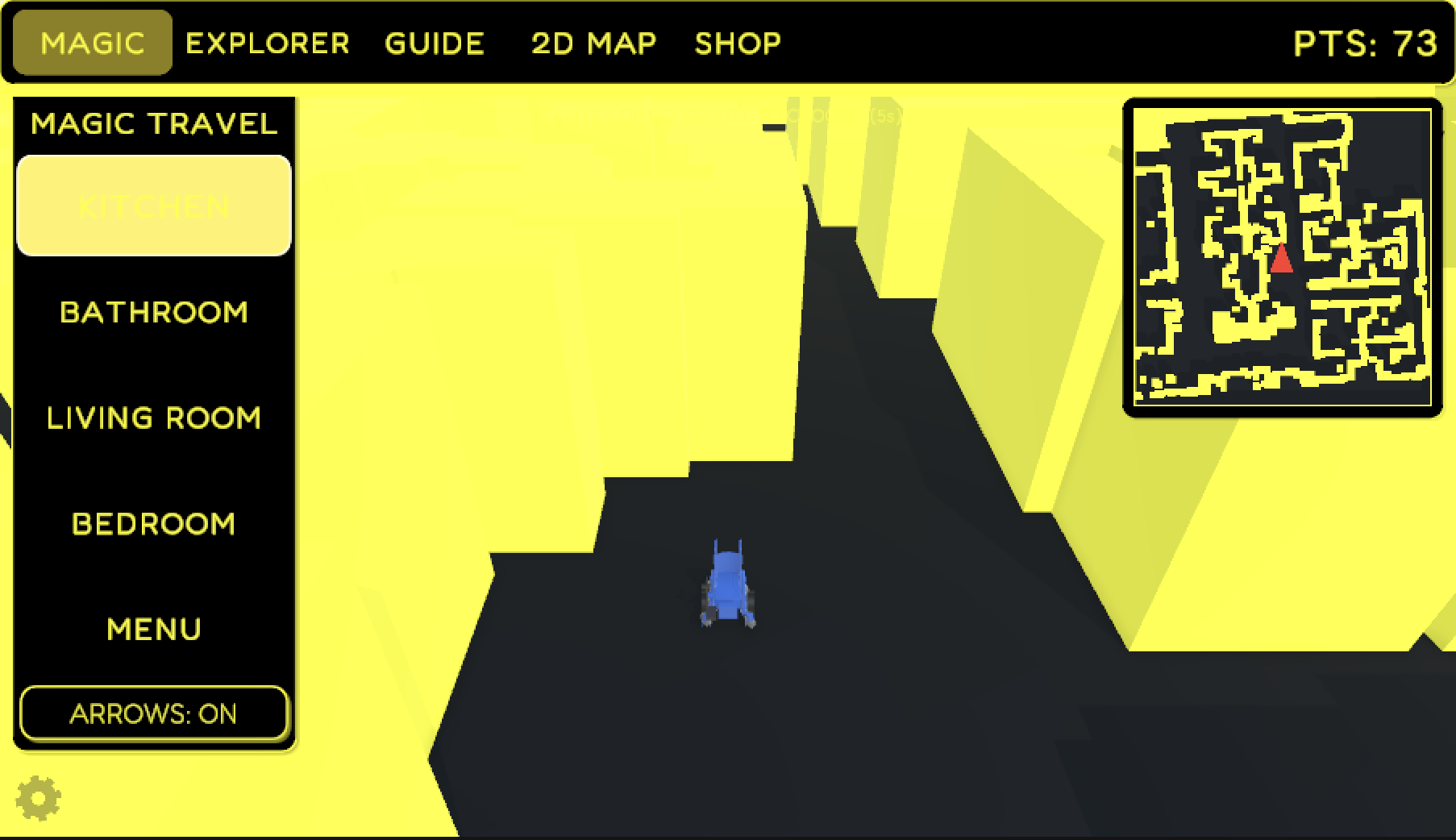
- magic travel - pick a room card and the chair drives there. an adult calibrates each room once by tapping the mini-map, and the route shows as a glowing line plus chevrons on the floor, which are easier for young children to follow.
- smart guide - a follow-assist mode: pick what to follow (a caregiver, a corridor wall, a doorway) and the chair is guided toward it. detection sits behind an interface that is currently filled by a simulation stand-in, not real lidar.
- bci input - commands arrive as discrete markers (FORWARD, TURN_LEFT, TURN_RIGHT, STOP) over lab streaming layer, through a small python bridge, into the same entry point as a key press.
- the map - the clinic floor is rebuilt at runtime from the slam occupancy grid (crop, threshold, de-speckle, thicken walls, connectivity check) and baked into a navmesh, so a new map installs without rebuilding the project.
- a caregiver panel behind a gear you have to hold for 3 s - awkward for a child to trigger, with no pin for staff to forget. it controls switch access, map replacement and trimming, wall thickness, route arrows, collectibles and progress reset.
design choices
- accessibility is the primary code path, not an add-on. bolting a switch mode onto a conventional interface gives you two code paths and two sets of bugs, so the scanning loop came first: two-switch scanning, one-switch timed scanning, direct keys and bci markers all call the same trigger. there's one behaviour to validate instead of three, and a clinician sees the same feedback whatever the input method.
- one bridge for all motion and pose. ros 2 owns localization, planning, motion and safety; unity owns visualization, interaction, accessibility and gamification. everything crossing that line goes through a single component, so moving from local simulation to the live robot is a configuration change, not a rewrite. this was the most consequential decision - the interface, accessibility and reward systems don't depend on which side is driving.
- rewards come from measured pose, not commanded motion. rewarding the command would have been much simpler, but it would congratulate a child for a trip the chair never completed - misleading for a kid learning cause and effect. pickups use a distance check against the bridge's pose event rather than a physics trigger, so they work unchanged when the ros pose drives the avatar.
- walls are or-reduced rather than averaged when the occupancy grid is downsampled, because averaging thins walls and can open gaps a planner will drive through - or-reduction can only thicken them.
- the access method belongs to the user, not the screen. dwell time (default 5 s), input source, bci latency compensation and auto-pause live in one persisted settings object shared by every scan context, and inputs are debounced to reject the involuntary repeat presses common with spastic or ataxic movement.
- redundant feedback. a highlighted control scales up and its outline pulses as well as changing colour, so a child who can't perceive the colour change still sees the size change. the palette is yellow on black for maximum contrast.
- eeg classification stays outside unity. unity only consumes short command strings - the same information as a key press - so the driving code didn't change when bci input was added.
- built for a mini-pc, not a workstation. the runtime target is a beelink ser5 driving the chair's screen, where a stutter mid-trip is a safety concern rather than a cosmetic one - so collectibles are pooled, theme changes swap a shared material, and the route line pre-allocates its buffers so nothing allocates in steady state.
what went wrong
- double-firing: with only two keys serving every screen, an overlay and the driving controller both consumed enter in the same frame, so opening settings instantly selected its first item. fixed with a single global focus stack where only the top-most context reads input - and it prunes destroyed entries, otherwise a panel destroyed during a scene reload could silently block driving.
- wall clipping: moving the chair with transform.translate bypassed the navmesh agent and let it pass through walls - unacceptable in a system whose premise is safe navigation. i rerouted motion through the agent, so the boundary is enforced by construction instead of by a collision check that could be missed at speed.
- turns that snapped or dropped inputs: instant rotation looked wrong and taught nothing about how the chair really turns, and a non-cancellable turn ignored a quick left after a right. the turn is now cancellable and computed from the remaining angle, so it ends at exactly 45° regardless of frame rate.
- stuck state: switching modes mid-turn halted a routine before it cleared its 'busy' flag, leaving the controller unresponsive. those flags now also reset when the component is disabled.
- disconnected rooms: thickening walls into a readable floor plan could wall over the junction where a narrow corridor meets a room - at a thickness of 2, two of four rooms became unreachable. checking every pair of cells stayed connected was too strict (it tripped on harmless sealed nooks), so the fix counts room-sized connected regions before and after thickening and backs the thickness off until that number is unchanged.
- lsl samples lost inside unity: the direct lsl inlet connected but pull_sample never returned data. a packet capture showed valid samples arriving and being acknowledged at the tcp level, so the fault was in the native library under unity's mono runtime, not in project code. the working setup is a small python process that receives the lsl stream and forwards each marker to unity as a text line over a local tcp socket; the unity-side handling is identical, so the bridge can go if the underlying issue is fixed.
- a blind lidar that passed every health check: after porting the sim to gazebo fortress, nav2 accepted goals and planned fine but the chair only crept forward. under the vm's hardware-accelerated opengl, gazebo's gpu lidar was returning its 0.3 m minimum range on every beam while still publishing at a normal 30 hz, so the local costmap saw a solid ring of obstacles. no error was logged. forcing software rendering restored correct ranges.
what i learned
- validate a sensor by the values it reports, not the rate it reports them.
- fix interfaces early. the bridge was locked in before any controller was written, which is why none of them contain navigation logic.
- build the environment pipeline before the ui, so everything after it gets exercised against a realistic floor plan and a genuinely baked navmesh.
- test every screen each way a user could reach it - keyboard, the two scanning keys alone, and one-input timed scanning - so nothing is reachable by one path but not the others.
status
the unity client is functionally complete as a self-contained simulation - one scene, 47 runtime scripts, roughly 7,900 lines of runtime c# - and every working child-facing feature was exercised end to end in the editor with the two-key loop alone. it already subscribes to the robot's map-frame pose from ros 2. on the ros side, the gazebo fortress backend is verified: nav2 produced a 128-pose plan to a commanded goal and the simulated chair finished 0.24 m from it. what's not done: sending goals and velocity from unity to ros 2 is still stubbed, so motion in this build runs on unity's navmesh; the unity map and the fortress map are different maps and still need to agree; smart guide detection is simulated; and the bci path has only been tested with a stub classifier broadcasting markers over lsl - no eeg has been recorded or classified yet. nothing has been evaluated with children, so the accessibility claims are architectural, not empirical.
context
built as part of my work in the neuromuscular control and biomechanics laboratory (ncbl) at the glenrose rehabilitation hospital, under the guidance of a graduate-student researcher, to support ongoing academic work in assistive pediatric robotics.
gallery
system architecture - solid arrows are implemented; the dashed arrow (goal and velocity publishing from unity to nav2) is stubbed in the current build. all motion and pose traffic crosses the unity-ros boundary through one bridge.